CamAPS + Glooko + Nightscout?
CamAPS FX can make thousands of small decisions about insulin delivery. The problem begins when the user later wants to understand why a particular day ended with excellent results or why the algorithm could not bring glucose levels under control for several hours.
The CamAPS app itself displays the most important information needed for daily loop use. For a more detailed therapy analysis, however, this is sometimes not enough.
In my opinion, the best setup for a CamAPS user combines three tools:
CamAPS FX manages therapy and records data
Glooko receives data from the CamAPS app
diab.ninja retrieves data from Glooko and makes it available in reports and Nightscout
We also receive current glucose readings from the CGM (Dexcom/Libre) and send them to Nightscout using xDrip or Zukka.
Once configured correctly, you can analyze glucose levels alongside insulin, bolus, and carbohydrate data - all in one place
What is CamAPS FX?
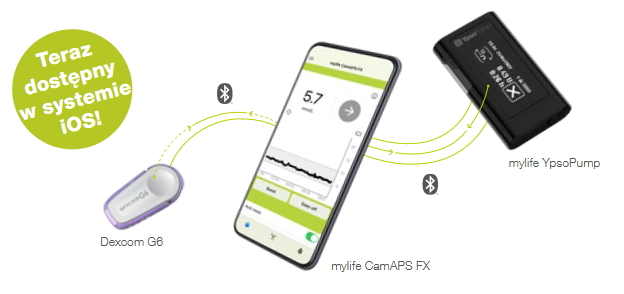
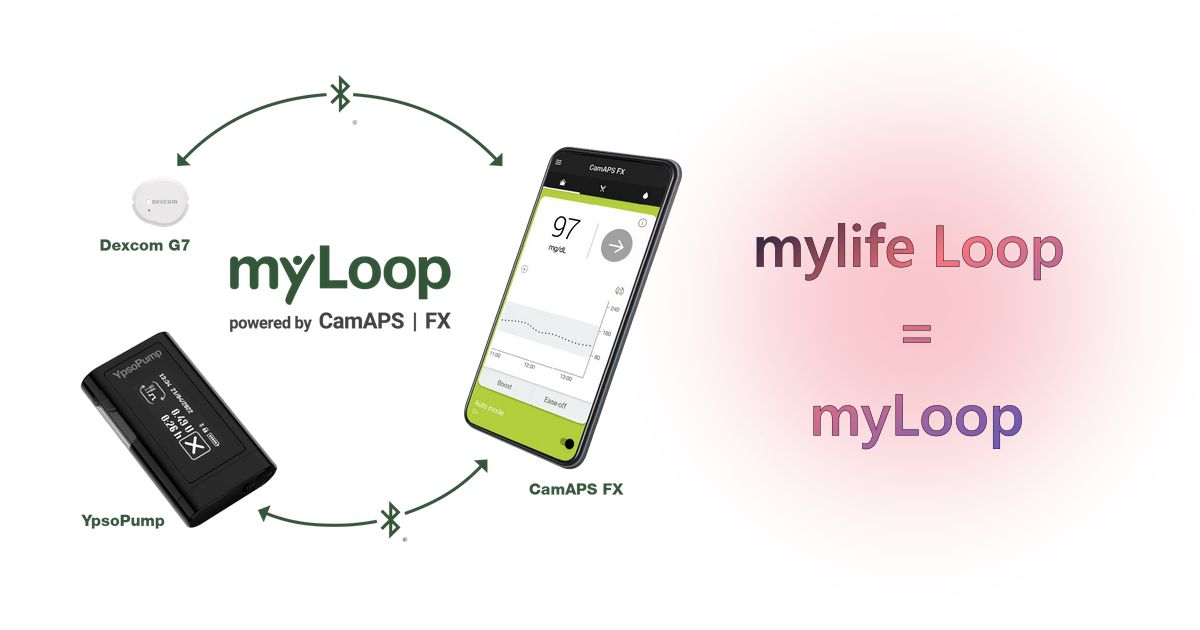
CamAPS FX is an app that controls a hybrid closed-loop system. It combines data from a continuous glucose monitoring system with the operation of a compatible insulin pump.
The algorithm analyzes factors including:
current glucose level,
the direction and rate of glucose changes,
previous insulin requirements,
delivered boluses,
declared meals,
the body's individual response.
Based on this information, CamAPS automatically adjusts insulin delivery. The user still has to perform some tasks, primarily informing the system about meals, which is why CamAPS FX is described as a hybrid closed-loop system.
You can also find more information about the system in the CamAPS FX documentation on diab.ninja.
What is Glooko?
Glooko is a platform designed to collect and analyze diabetes data from various devices and apps.
For CamAPS FX, Glooko acts as an intermediary. The CamAPS app sends data to Glooko, which diab.ninja can then retrieve.
This distinction matters: Glooko does not control the loop or alter the algorithm's decisions. It serves as data storage and an exchange platform.
Depending on account availability and configuration, it may receive:
CGM glucose readings,
bolus information,
basal insulin data,
carbohydrate entries,
pump operation data,
therapy history used to generate reports.
How does the data flow?
The connection follows this sequence:
CGM and pump -> CamAPS FX -> Glooko -> diab.ninja -> Nightscout and reports
Each component handles a different stage.
CamAPS FX collects data and controls insulin delivery. Glooko stores the information sent by CamAPS. diab.ninja periodically retrieves it from the Glooko account, processes it, and displays it in reports and your Nightscout instance.
If synchronization stops at any stage, the systems further down the chain will also stop receiving current data.
What do you need before you begin?
Prepare:
an active mylife CamAPS FX app,
a working Glooko account,
a Nightscout instance on diab.ninja,
access to the diab.ninja panel,
your Glooko account login and password,
access to the phone running CamAPS FX.
First, confirm that the data is visible in the CamAPS app itself. The integration will not fix problems with the sensor, pump, Bluetooth, or the phone's internet connection.
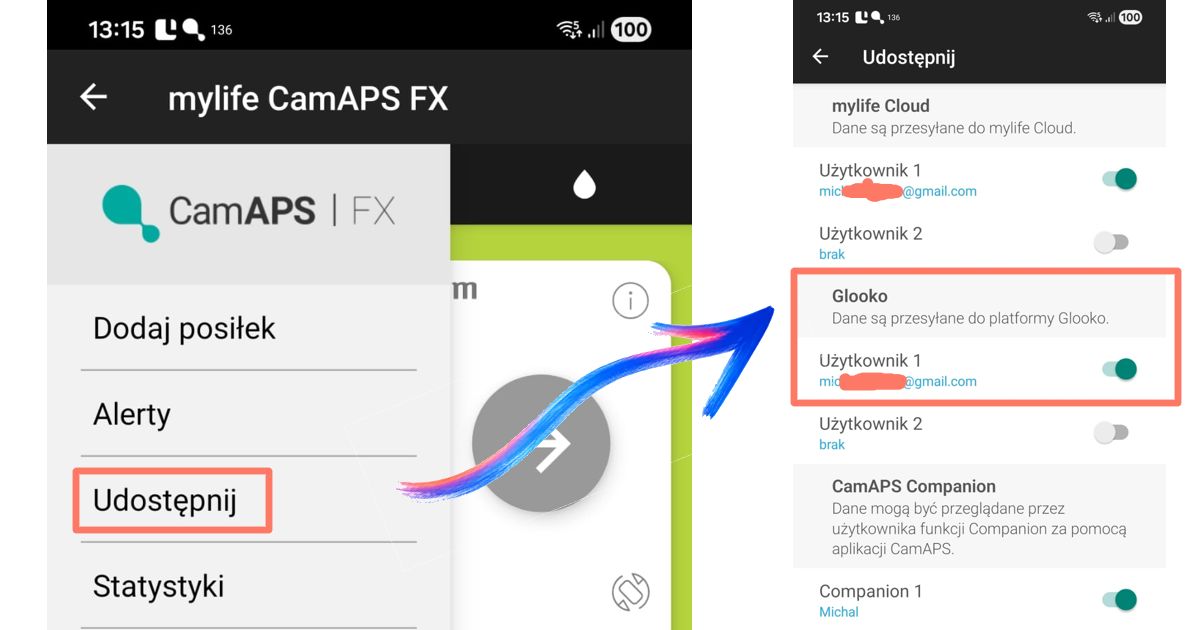
Step 1: enable Glooko data sharing in CamAPS FX
Synchronization must be started in the mylife CamAPS FX app.
Open the CamAPS FX app on your phone.
Tap the menu icon in the upper-left corner.
Select "Share".
Find "Glooko" in the list of available services.
Enable sharing for the correct user account.
Confirm that the switch next to the account is active.
The email address assigned to data sharing should match the Glooko account that you will later configure in diab.ninja.
After enabling the option, the data may not appear immediately. The phone must have internet access, and CamAPS must be able to operate correctly in the background.
Step 2: check your Glooko account
Sign in to your Glooko account and confirm that current data is visible.
Do not continue if Glooko does not contain data from CamAPS. diab.ninja can only retrieve information that has already been sent to Glooko.
If no data is available at this stage, the problem lies between CamAPS and Glooko, not with Nightscout.
Step 3: connect Glooko to diab.ninja
Once the data is visible in Glooko, configure the source in the diab.ninja panel.
Sign in to the diab.ninja panel.
Open your instance configuration.
Go to the CGM integration section.
Open the "CGM Connect Integration" window.
Select "Glooko" as the data source.
Enter your Glooko account login.
Enter your Glooko account password.
Click "Save".
After saving the configuration, diab.ninja will begin retrieving data periodically.
Keep in mind that Glooko data is delayed by approximately 2 hours.
Step 4: check the data in the diab.ninja panel
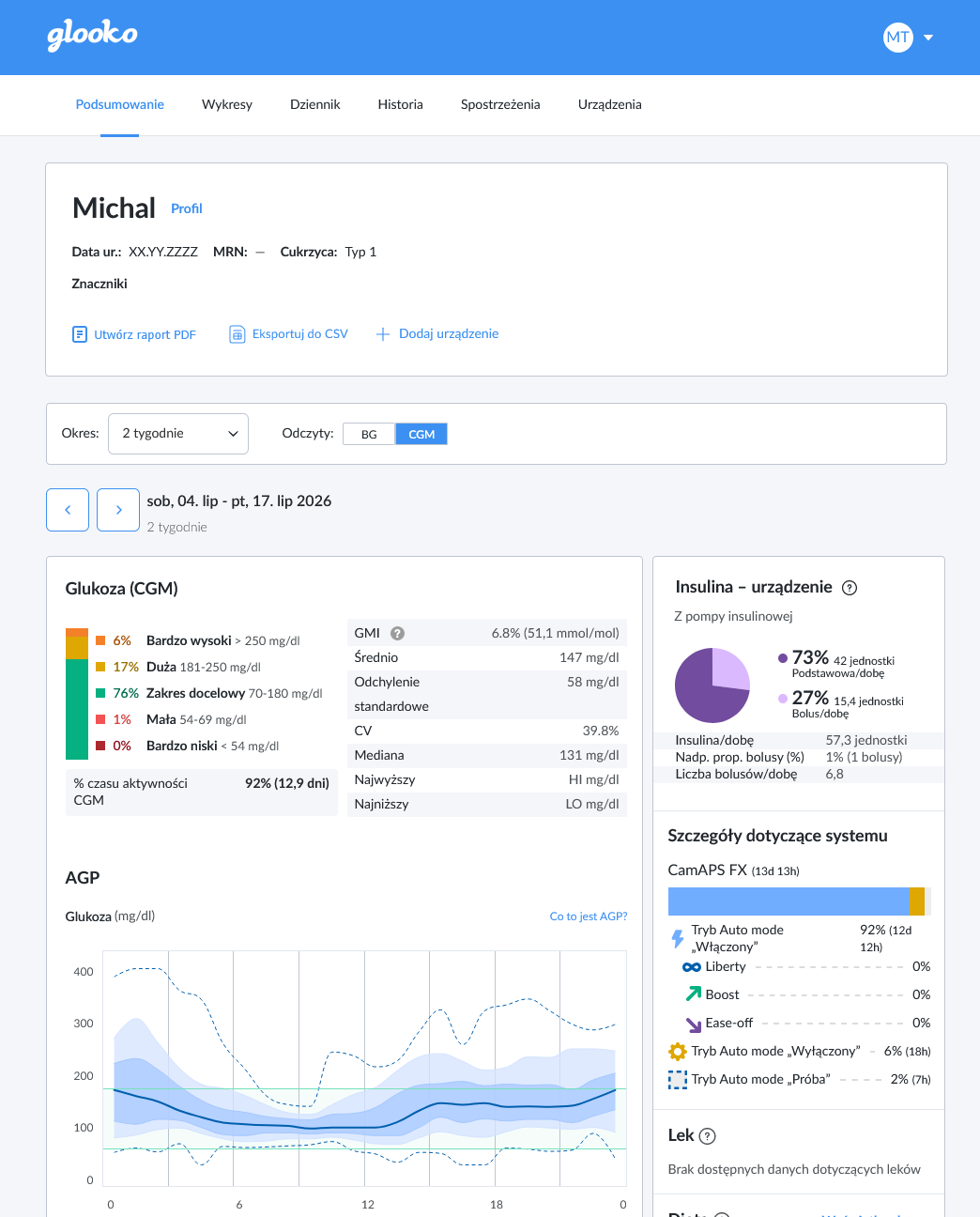
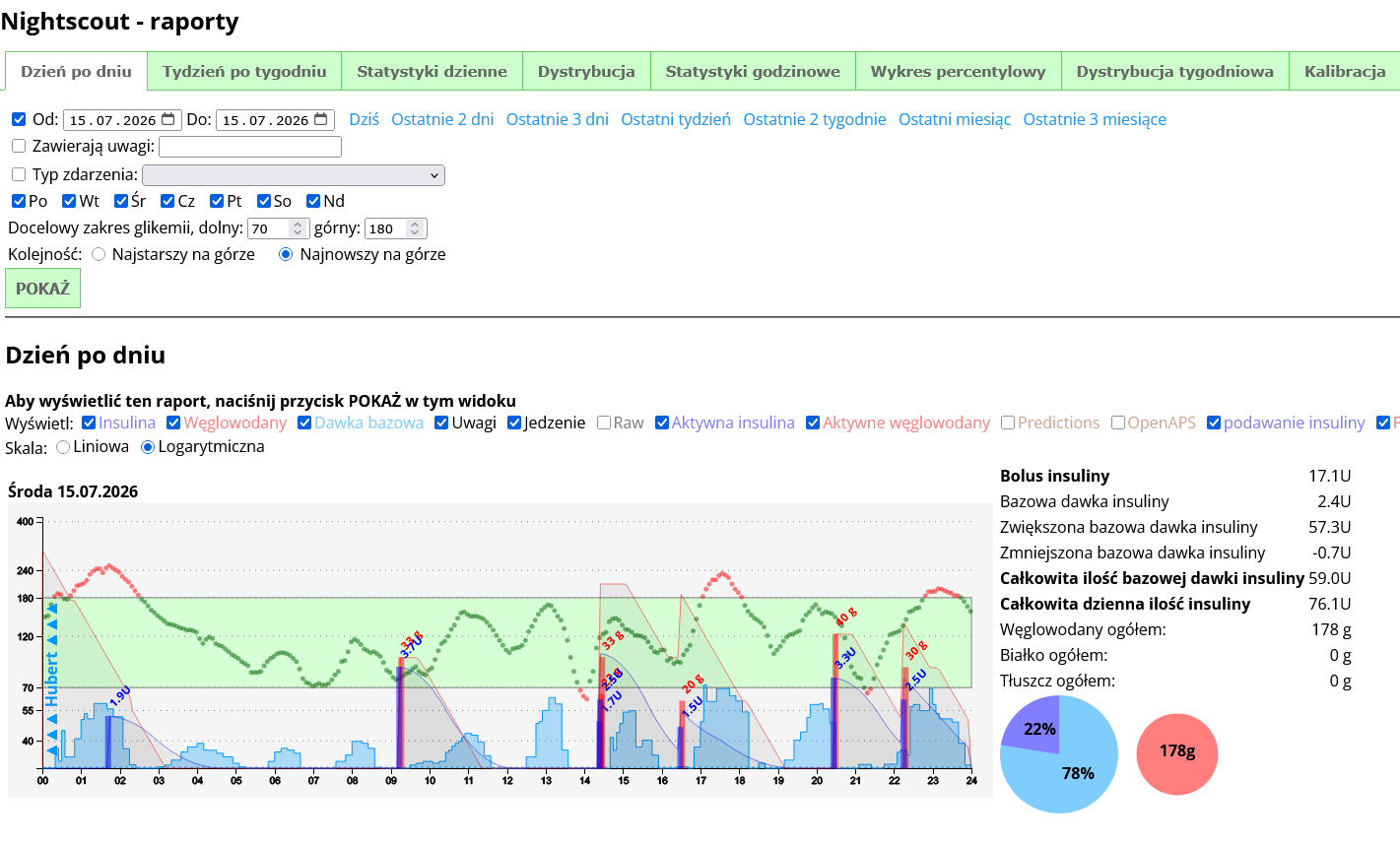
Once synchronization begins, open the reports available in the panel.
Depending on the range of data sent by CamAPS and Glooko, you may see:
a glucose chart,
meal markers,
the number of carbohydrate grams,
delivered boluses,
hourly insulin distribution,
a breakdown of basal and bolus insulin,
daily summaries,
charts showing insulin and carbohydrate proportions.
This data reveals how a glucose result was achieved, rather than showing only the final number.
A day with a high TIR may look impressive in a summary while requiring numerous corrections, frequent extra carbohydrates, or aggressive algorithm responses. Without insulin and meal data, that context disappears.
Step 5: check your Nightscout instance
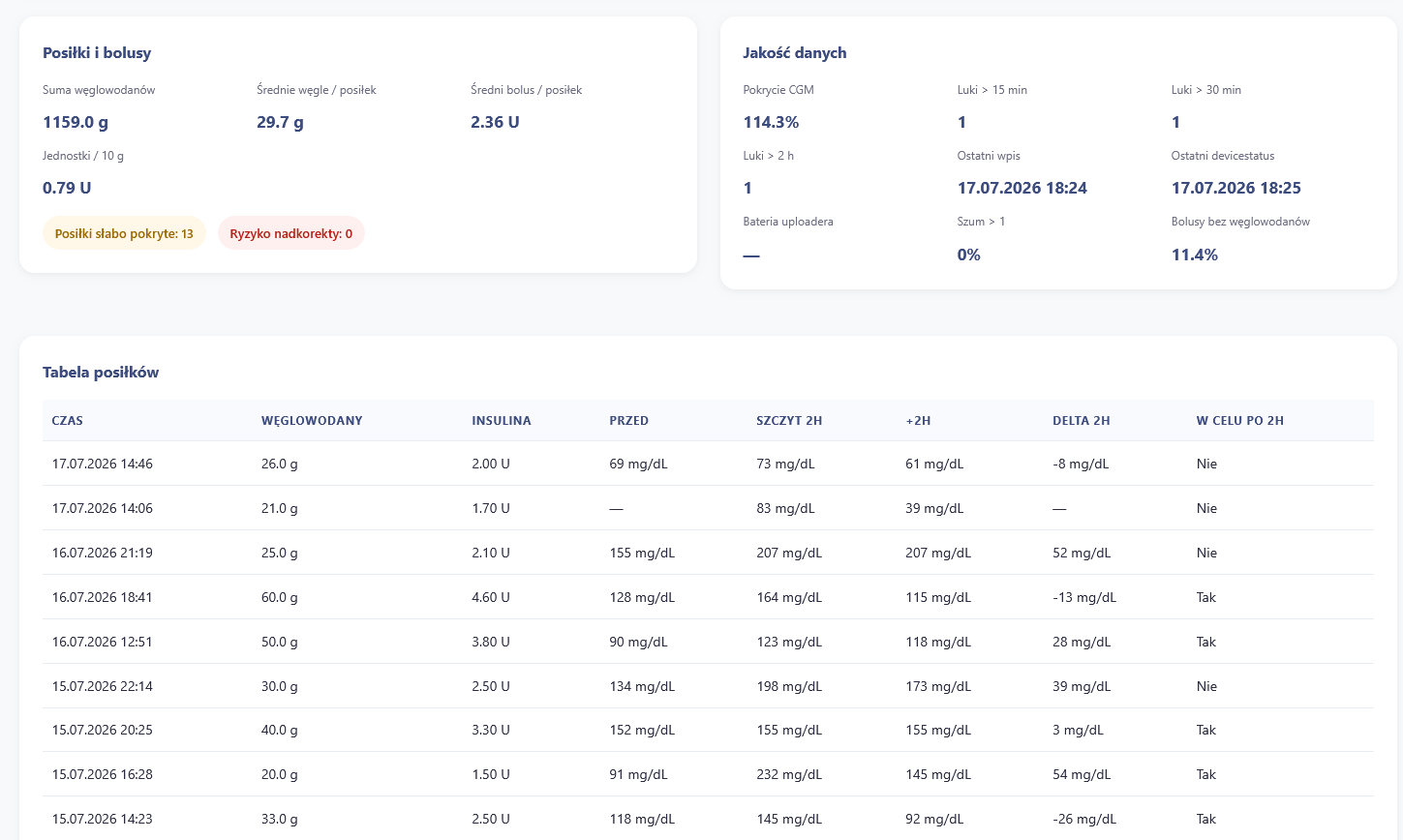
Open the address of your Nightscout instance, for example:
https://twoja-nazwa.diab.ninja
Check:
whether meal and insulin entries are visible,
whether the date and time zone are correct.
What should you analyze in loop data?
The most useful analysis compares several factors at the same time
Post-meal glucose levels
Check when glucose begins to rise, how high the peak is, and how long it takes to return to the target range.
A single high reading does not prove that the insulin-to-carbohydrate ratio is wrong. The cause may be a late bolus, an underestimated portion, fast-acting carbohydrates, or an infusion-site problem.
Basal and bolus insulin proportions
A large amount of automatically delivered insulin may indicate that the algorithm is spending hours compensating for underestimated meals or poorly optimized settings.
Do not change settings based on a single day. Look for a pattern that repeats at a similar time and under similar conditions.
Loop activity overnight
Nighttime is particularly useful for evaluating settings because there are usually fewer meals, less physical activity, and fewer manual corrections.
Recurring nighttime rises or drops may indicate an issue that should be discussed with your diabetes care team.
Carbohydrates and boluses
The data is reliable only when meals are entered consistently.
If some carbohydrates were not declared, the report may suggest insufficient boluses or excessive algorithm activity even though the real cause was a missing entry.
How to solve the most common problems
No data appears in Glooko
Check:
whether Glooko sharing is active in CamAPS,
whether the correct account was selected,
whether the phone has internet access,
whether CamAPS is allowed to run in the background,
whether you are signing in to the correct Glooko profile.
The data is in Glooko but not in diab.ninja
The most common causes are:
an incorrect login or password,
a changed Glooko password,
an integration configuration that was not saved,
an account that requires reauthentication,
a temporary communication problem between the services.
Open the integration configuration, enter your credentials again, and save the settings. If the problem continues, you can submit a support request through the diab.ninja user portal.
Glucose data is visible, but boluses or meals are missing
Different types of information may not appear at the same time. The range of synchronized data may also depend on the app version, region, and account configuration.
First, check whether the missing entries are visible in Glooko. If they are missing there as well, Nightscout has no source from which to retrieve them.
Data appears with a delay
Cloud integration does not provide immediate synchronization. The data may be delayed by approximately 2 hours. Nightscout connected through Glooko should be treated as a monitoring and analysis tool, not as the sole source of alerts requiring an immediate response.
Data stopped after a password change
After changing your Glooko password, update it in the diab.ninja panel as well. The old login credentials will not be replaced automatically.
Is this integration worth configuring?
Yes, especially for people who want to understand how their therapy works instead of relying on a single TIR result.
CamAPS FX does its job in the background, but the native app does not always present data in a format suited to long-term analysis. Glooko addresses part of that weakness, while diab.ninja and Nightscout provide reports, history, and convenient browser access.
The strongest advantage of this setup is the ability to place glucose, insulin, and meal information on a single timeline. Without that context, it is easy to misinterpret a good result or view a difficult day as a failure even when the loop performed a great deal of effective work.
Data will not change therapy on its own. It can, however, expose a recurring problem much earlier than average glucose or HbA1c.